The password field
Forms, Text, SVG
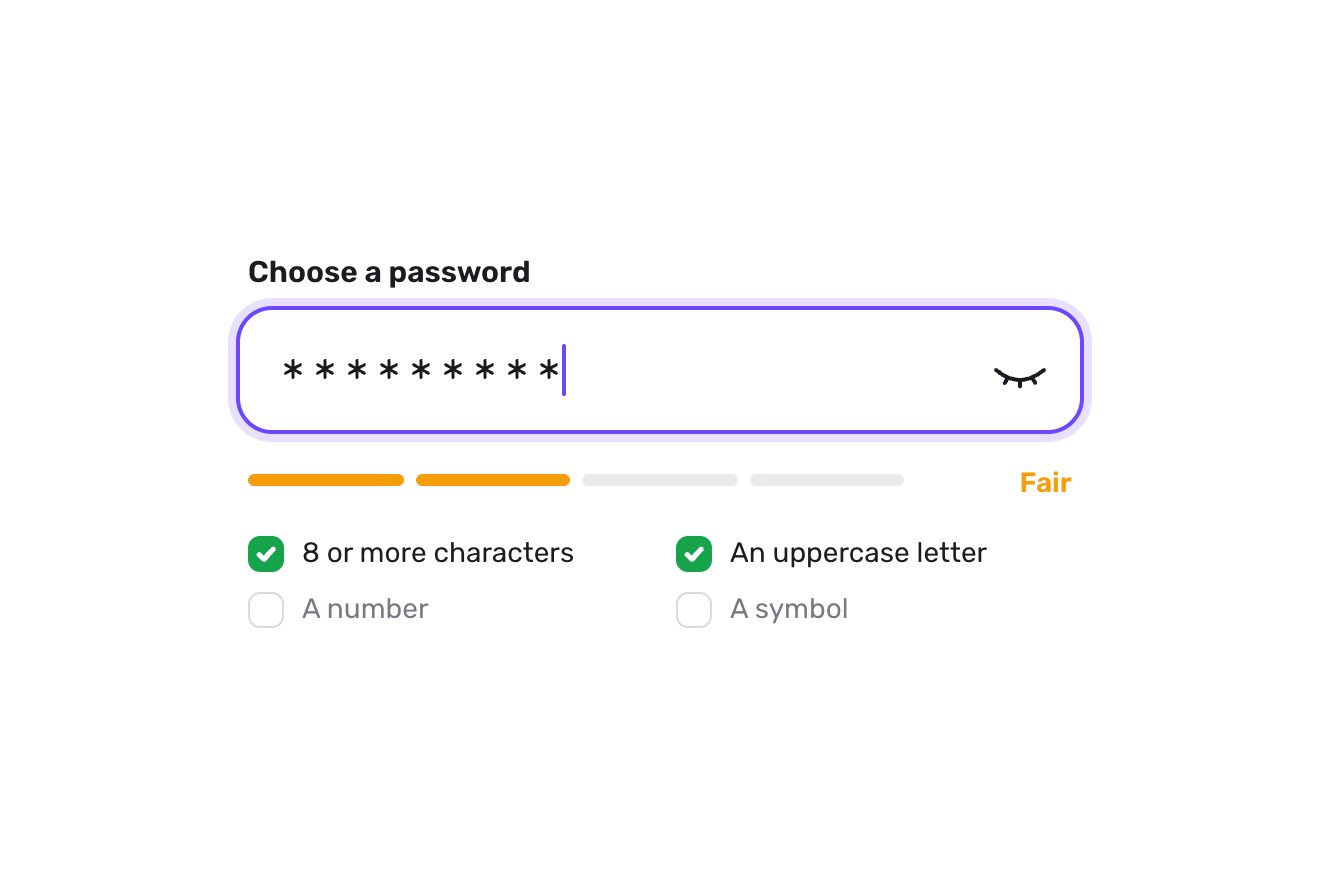
The field to create the password of a made-up account, Fernway, alone on white in the premium style of product shots. As you type, four small bars under the field fill on a spring one after the other and the word beside them rolls from Weak to Fair, Good and Strong, each in its colour; the four rules below (8 characters, an uppercase letter, a number, a symbol) tick themselves, drawing the check in the green circle. The eye shows the password: the lid opens and the slash wipes away. Continue wakes up with a bounce only when every rule is met and, pressed, says Password set with the check and a light crossing it.
A folder that runs on its own: index.html, style.css, script.js and the libraries from a CDN. The React and Vue tabs hold the same demo as a ready component, which switches its animations off when it leaves the page.
<!doctype html>
<!--
"New password field" from Animorio · https://animorio.com
License: free on your own sites and your clients’ sites, paid work included.
Not for resale, redistribution, templates or code collections · https://animorio.com/en/license/
-->
<html lang="en">
<head>
<meta charset="utf-8">
<meta name="viewport" content="width=device-width, initial-scale=1">
<title>The new password field with the strength meter and the rules that tick themselves</title>
<link rel="stylesheet" href="https://cdn.jsdelivr.net/npm/@fontsource-variable/mona-sans@5.3.0/wdth.css">
<link rel="stylesheet" href="style.css">
</head>
<body>
<main class="stage">
<!-- a new password field: four bars fill on a spring as the password gets stronger, the label rolls from Weak to
Strong, and the four rules under it tick themselves one by one; the eye shows the password; Continue wakes up
only when every rule is met -->
<form class="pw" data-pw novalidate>
<div class="pw__top">
<label class="pw__label" for="pw-input">Create a password</label>
<span class="pw__note">Fernway account</span>
</div>
<div class="box" data-box>
<svg class="box__lock" viewBox="0 0 20 20" aria-hidden="true">
<rect x="4.2" y="8.6" width="11.6" height="8.4" rx="2.4"></rect>
<path class="box__shackle" data-shackle d="M6.9 8.6V6.4a3.1 3.1 0 0 1 6.2 0v2.2"></path>
</svg>
<input class="box__input" id="pw-input" data-input type="password" autocomplete="new-password" spellcheck="false"
placeholder="At least 8 characters" aria-describedby="pw-strength pw-rules">
<button class="eye" type="button" data-eye aria-label="Show password" aria-pressed="false">
<svg viewBox="0 0 24 24" aria-hidden="true">
<path class="eye__lid" d="M2.8 12s3.3-6.2 9.2-6.2 9.2 6.2 9.2 6.2-3.3 6.2-9.2 6.2S2.8 12 2.8 12Z"></path>
<circle class="eye__pupil" data-pupil cx="12" cy="12" r="2.9"></circle>
<path class="eye__slash" data-slash d="M4.6 4.6 19.4 19.4"></path>
</svg>
</button>
</div>
<div class="meter" id="pw-strength" aria-live="polite">
<div class="meter__bars">
<span class="bar"><i data-bar></i></span>
<span class="bar"><i data-bar></i></span>
<span class="bar"><i data-bar></i></span>
<span class="bar"><i data-bar></i></span>
</div>
<span class="meter__word" data-wordbox><span class="word" data-word> </span></span>
</div>
<ul class="rules" id="pw-rules">
<li class="rule" data-rule="len"><svg viewBox="0 0 16 16" aria-hidden="true"><circle cx="8" cy="8" r="6.4"></circle><path data-tick d="M5 8.3 7.1 10.3 11 6"></path></svg><span>8 characters or more</span></li>
<li class="rule" data-rule="upper"><svg viewBox="0 0 16 16" aria-hidden="true"><circle cx="8" cy="8" r="6.4"></circle><path data-tick d="M5 8.3 7.1 10.3 11 6"></path></svg><span>An uppercase letter</span></li>
<li class="rule" data-rule="num"><svg viewBox="0 0 16 16" aria-hidden="true"><circle cx="8" cy="8" r="6.4"></circle><path data-tick d="M5 8.3 7.1 10.3 11 6"></path></svg><span>A number</span></li>
<li class="rule" data-rule="sym"><svg viewBox="0 0 16 16" aria-hidden="true"><circle cx="8" cy="8" r="6.4"></circle><path data-tick d="M5 8.3 7.1 10.3 11 6"></path></svg><span>A symbol</span></li>
</ul>
<button class="go" type="submit" data-go disabled>
<span class="go__face">
<span class="go__sweep" aria-hidden="true"></span>
<span class="go__label" data-golabel>Continue</span>
<span class="go__done" data-done aria-hidden="true"><svg viewBox="0 0 16 16"><path data-donepath d="M3.6 8.4 6.6 11.2 12.4 5"></path></svg>Password set</span>
</span>
</button>
</form>
<svg class="ghost" data-ghost viewBox="0 0 24 24" aria-hidden="true"><path d="M5 3.2 19.2 11l-6.3 1.6-3.3 5.9Z"></path></svg>
</main>
<script src="https://cdn.jsdelivr.net/npm/gsap@3.15.0/dist/gsap.min.js"></script>
<script src="script.js"></script>
</body>
</html>Change values, colours and text with the controls and watch the animation respond live. Or write in the code yourself. Then download the folder with your changes.
27 values to change
With the Animorio connector, Claude Code, ChatGPT, Cursor or VS Code take it from here, guide included, and fit it into your project. Paste this request:
Take “New password field” from Animorio and fit it into my siteFour tests with regular expressions (length, uppercase, number, symbol): the level is the number of tests passed, from Weak with one to Strong with all four. Each rule remembers whether it was met, so the check draws or wipes only when it changes.
Four grey bars with a fill inside scaled horizontally from 0 to 1 with back.out: going up they fill one after the other with a small delay and all take the level’s colour; going down they empty from the right with power2.in.
The word sits in a one-line window with hidden overflow: it leaves upwards and comes back from below when the level rises, the other way when it drops, with a bounce; the colour is read from the CSS variables.
The eye switches the input type between password and text, wipes the slash with stroke-dashoffset and opens the pupil with back.out. Continue is disabled until the level is Strong; pressed, the label leaves, Password set comes in and the check draws itself.
| Name | File | Default | What it changes |
|---|---|---|---|
MIN_LENGTH | script.js | 8 | How many characters the first rule asks for. |
PASSWORD | script.js | Harbor42! | The password the autopilot types, getting stronger. |
TYPE_SPEED | script.js | 0.16 | How many seconds per letter when the autopilot types. |
BAR_SPRING | script.js | 1.6 | How much the bars overshoot when they fill. |
BAR_STAGGER | script.js | 0.07 | How many seconds between one bar and the next. |
TICK_TIME | script.js | 0.32 | How many seconds a rule’s check takes to draw. |
SHOW_WHILE_TYPING | script.js | true | Whether the autopilot opens the eye halfway to show the password. |
In the sign-up of an app or a service, in changing the password in the account settings, in the reset after a forgotten password: wherever a new password is asked for and it pays to say what is missing while typing, instead of an error after pressing Continue.
The box narrows to the screen width minus thirty-two pixels, the rules stay in two columns; the field text is sixteen pixels so iOS does not zoom the page on tap, and the eye has a thirty-eight pixel tap area.
No springs or bounces: the bars fill at once, the word changes with a fade, the checks and Password set appear already drawn. The drawn pointer is not shown, the demo still loops.
GSAP 3.15.0, Mona Sans (font variabile) 5.3.0.
Compressed with gzip, the three demo files weigh 7.0 KB; the libraries: GSAP 28 KB.
Tested on 14 November 2026
Use it in your own projects and in your clients’ projects. Do not resell it or redistribute it as is. GSAP stays under its own Standard license. Full license.
Support Animorio
Animorio stays free thanks to the people who support it. If you like, buy us a coffee: it helps us make the next animations.
You asked for
We made it for you: it’s in the library, with the preview, the Playground and the code to copy.
An animation you can’t find, or a site to take apart in the journal: tell us which. We pick the next ones from here.
With your account’s email and password.
or with your email
You’re signed in as .
With your account, you can download the zip of every animation and every pack, for free.