Heron AI, by Bearplus, Kenny Ho
Heron AI, how it’s made: the drawing that traces itself and opens, the box that finds the errors and the floor plan that assembles as you scroll
The site of Heron AI, an artificial intelligence agent for architects, loads by tracing the elevation of a house by hand, lets you drag a box over the drawing to find what is missing and assembles a floor plan wall by wall as you scroll. We take it apart with three demos rebuilt from scratch.
The palette
- #F3F2ECthe light paper of the background, with its grain
- #282828the near black of the text and the drawings
- #B3B3AFthe grey of the lines, the frames and the letters not yet lit
- #72726Fthe grey of the secondary text
- #F15534the orange of the ruler, the selection box and the marks to fix
Tap a colour to copy its code.
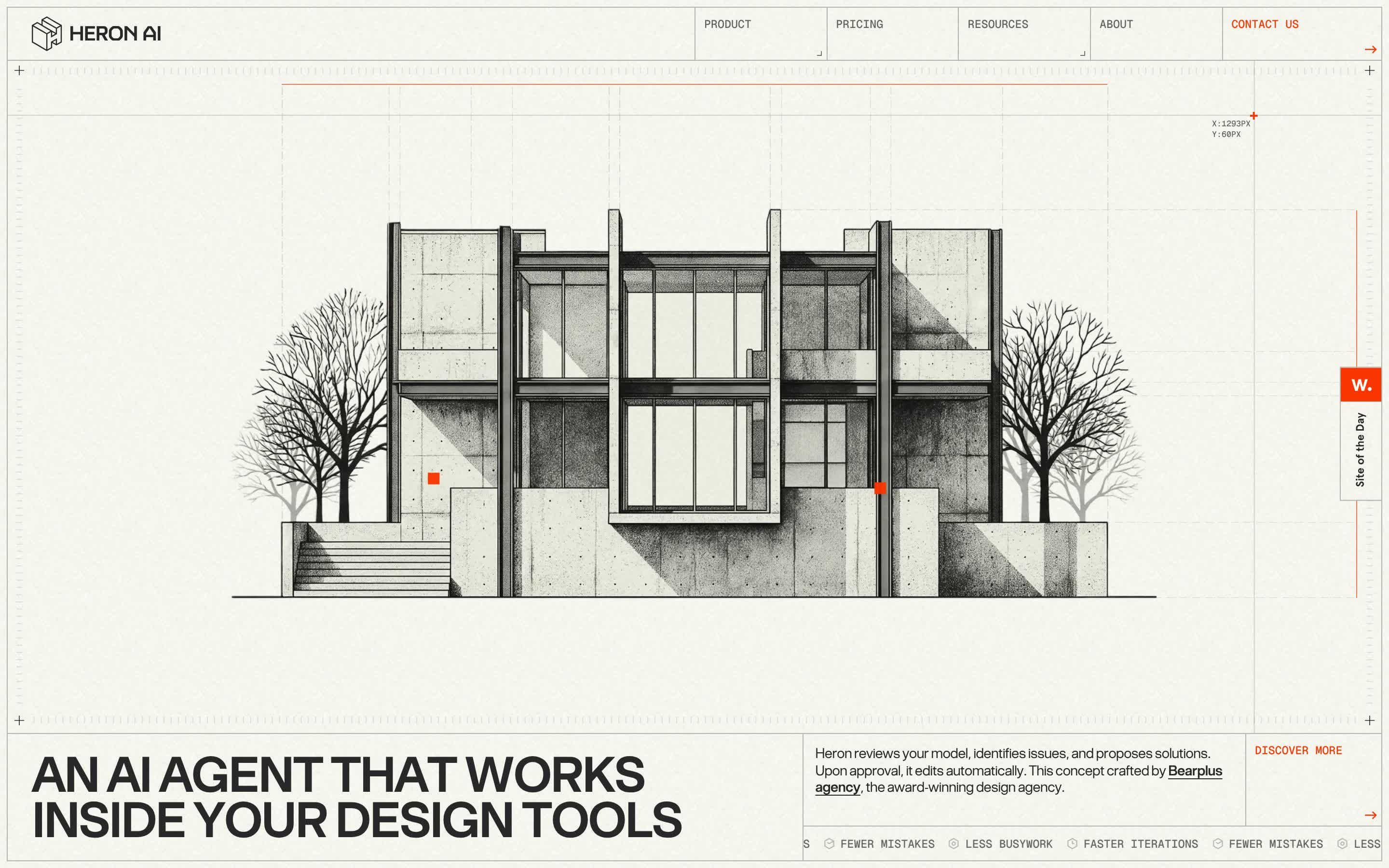
Heron AI presents an artificial intelligence agent that works inside the software architects draw with: it watches the model, finds what is wrong, suggests how to fix it and, once approved, fixes it by itself. The site says it is a concept by the studio Bearplus, and it shows: it is built like a drawing sheet. The background is light paper with its grain, #F3F2EC, the text and the drawings are near black, #282828, the lines and frames grey, #B3B3AF, and there is a single colour, an orange, #F15534, used for one thing only: pointing. There are two typefaces, a grotesque, BT Grotesk, for headlines and text, and a monospace, Geist Mono, for labels and measurements, like the notes in the margin of a technical drawing. On Awwwards it was Site of the Day on 12 October 2026, with 7.7 from the jury and the developer award, 7.01, where the highest mark is animations, 7.6.
It is a Webflow site, with jQuery 3.5 inside like every Webflow site, and the animation is GSAP 3.12.5 with ScrollTrigger, plus SplitText and TextPlugin taken from version 3.13. Smooth scrolling is Lenis 1.1.5, page changes are Barba, the rows of logos and cards are Swiper. All the code written for the site sits in a single file served from Netlify, and it is obfuscated: the strings are hidden in an encoded list and the variable names are letters. We put it back in plain text with a script of our own, without running it; the values we quote come from there.
We take it apart in three moments, with a demo rebuilt from scratch for each, for an invented agent, Egret, with its drawings: the house, the plan, the text and the code are ours. From the site we took the ideas and, where we say so, the numbers.
The drawing that traces itself and opens
You arrive and the loading screen is already the site: in the middle the elevation of a concrete house, with bare trees on the sides and the stairs, draws itself stroke by stroke as if in pencil; on the right, in monospace, a welcome card and a start-up list lighting up line by line; under the drawing an orange line grows with the percentage beside it. At one hundred the line splits in two, one half running up and one down, and between them the real house appears, with its shadows and its concrete.
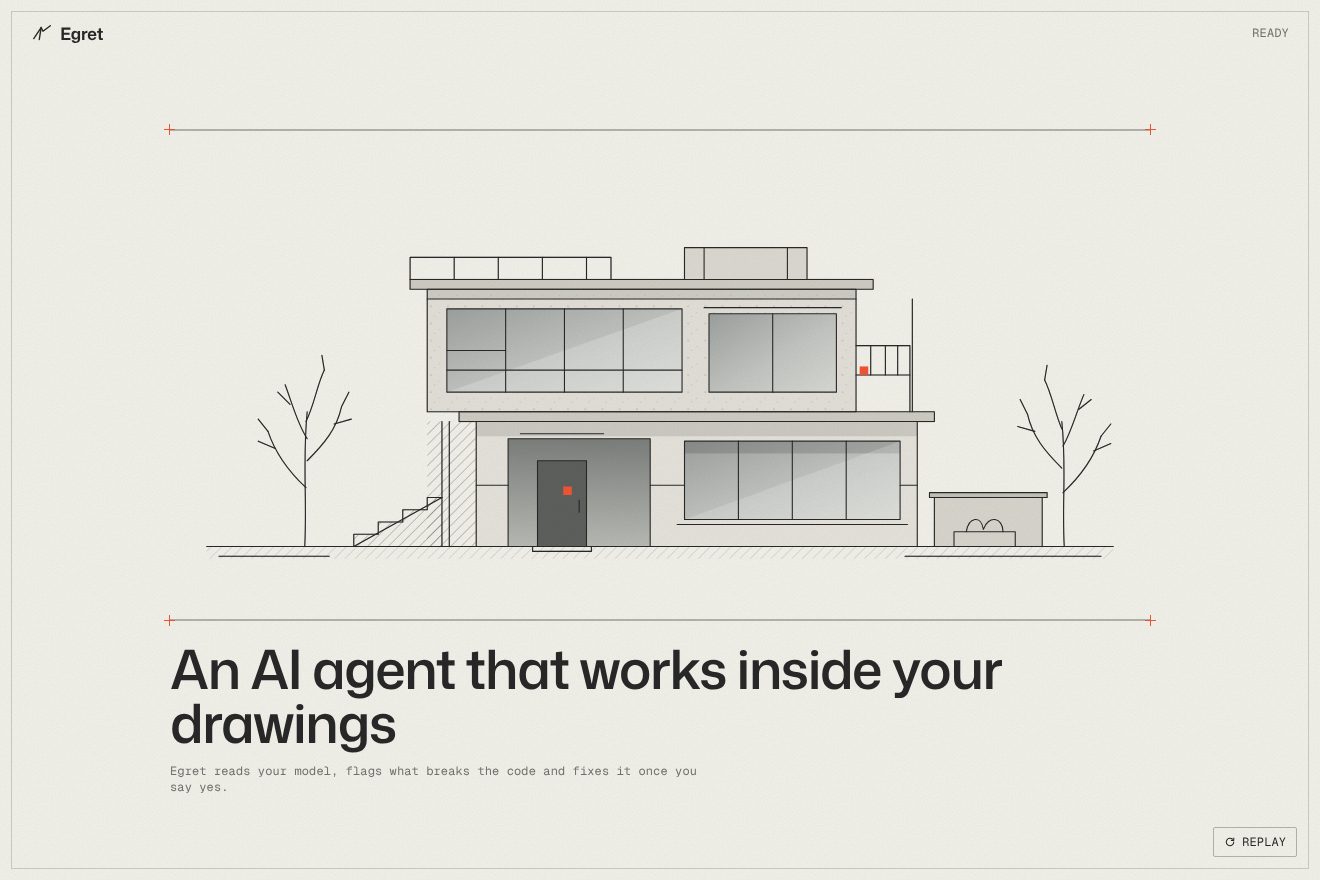
The drawing is an SVG of 63 paths and one line, on a sheet of 1712 by 890. Each path starts with its dash as long as itself and offset by its whole length, so it cannot be seen, and goes to zero in 1.3 seconds with power1.out; the paths start one after another spread over three seconds, from first to last. The headline rises from its masks word by word, half a second and two hundredths apart, and the start-up list lights up three tenths apart. The percentage is not a time but an animated number: it goes from 0 to 60 in three seconds with power2.out, then from 60 to 100 in two and a half seconds, slower at the end, and on every frame it widens the line. At the end the line becomes two lines which, in eight tenths, with a cubic-bezier(1, 0, 0.44, 1) curve that starts still and snaps, go one to the edge of the header and one to the bottom of the opening, and turn grey: between them a clip-path, recomputed on every frame, opens the image of the house. About five and a half seconds in all.
In our demo the drawing is a house by Egret, 52 strokes drawn by us, and the start-up list has eight items made of words instead of numbers, a little further apart so that they fill the loading time. From the site come the timing of the stroke, the start spread over three seconds, the percentage in two steps, the line splitting with its curve and the grey it ends in, the full house opening between the two halves and the headline rising from its masks. In ours the two lines do not go to the edges of the page but become the edges of the sheet. Ours are the line thickening for a moment before splitting and settling back with a bounce, the strokes of the first drawing turning from black to grey when the full one arrives, the windows with their reflection, the orange crosses at the corners and Loading turning into Ready.
The box that finds the errors
Over the house two rulers, a vertical and a horizontal line with an orange plus where they cross, follow the pointer, and beside it you read where you are, in pixels. Below, a line invites you to click and drag: an orange box is drawn, and if it touches one of the two red squares on the drawing its label opens, with the rule that is missing, a guardrail or a handrail.
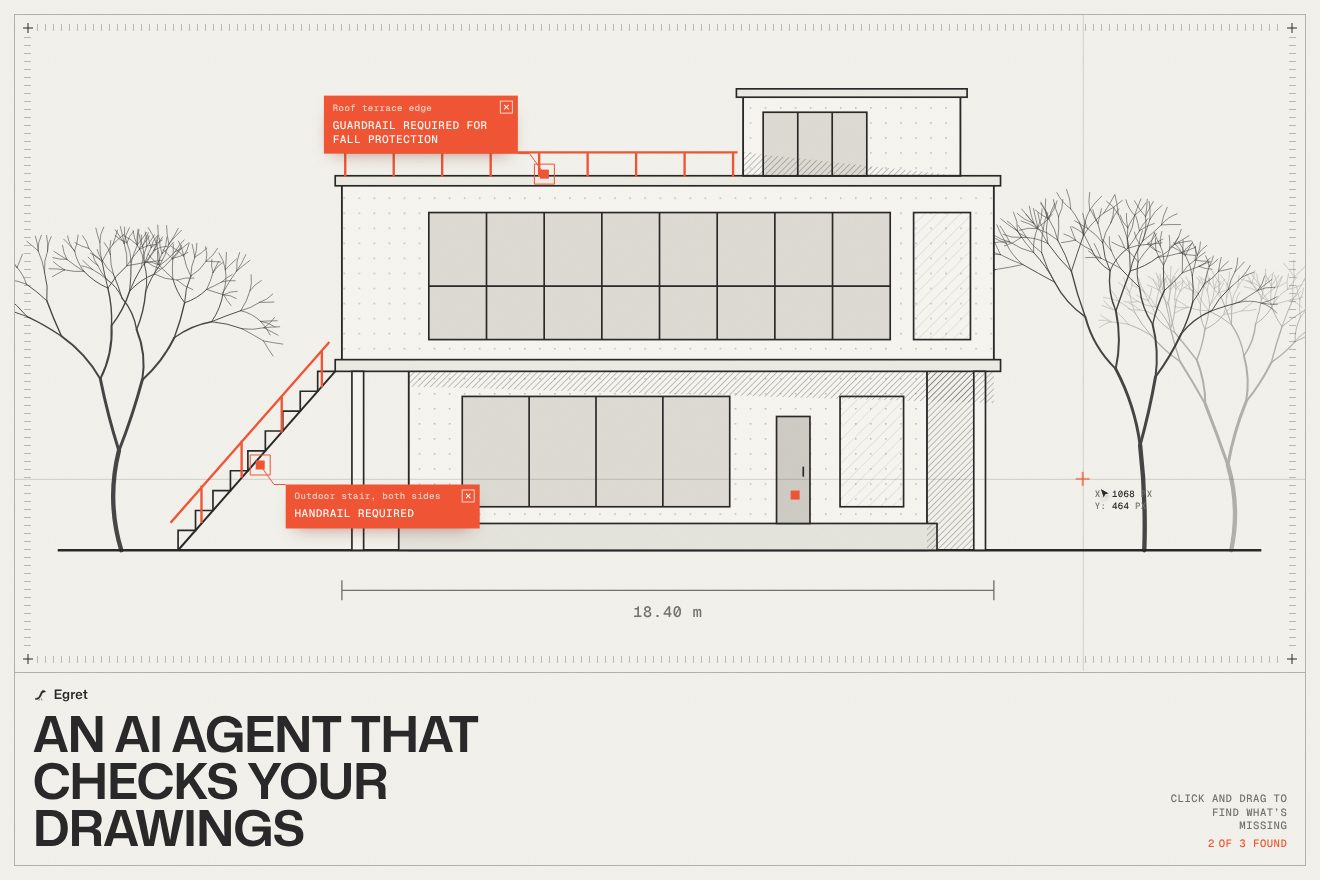
The rulers live in a requestAnimationFrame loop: the two lines have an opacity of 0.16 and fade out bit by bit as the pointer nears the edge, the plus grows up to 1.2 and changes transparency, and the coordinates, whole numbers, jump to the other side of the plus when they would not fit. The box is an element created on press, with the mouse or a finger, and it only appears after two pixels of movement, so that a click is not taken for a drag. It has a one-pixel orange border and a gradient background, from orange at 64 per cent opacity to transparent at 67.05 per cent of the diagonal, and the gradient turns, 315, 225, 45 or 135 degrees, depending on the direction of the drag: the full colour always sits in the corner under the pointer, the one being pulled. On every move the site compares the rectangle of the box with that of each mark, and the ones that overlap light up. On release the box disappears, and the labels found stay.
In our demo there are three marks, on Egret’s house: the stairs with no handrail, the terrace with no guardrail, the door that is too narrow. From the site come the rulers with their opacity and the way they fade at the edges, the coordinates in pixels, the two-pixel threshold, the border and gradient of the box with its four angles, the comparison between rectangles and the labels that stay. Ours are the four small handles at the corners of the box, the mark that hops when found and gets boxed in, the elbowed leader line running to the label, the fix drawn in orange on the house, the handrail, the guardrail, the wider door, and the rolling counter.
The floor plan that assembles as you scroll
Further down the page stops on two sentences, Right there with you and For the whole design, and as you scroll they make way for a floor plan: first the walls, which settle all together but each on its own, then the furniture, the dimensions and finally the red marks of the things to fix, each with its small card beside it.
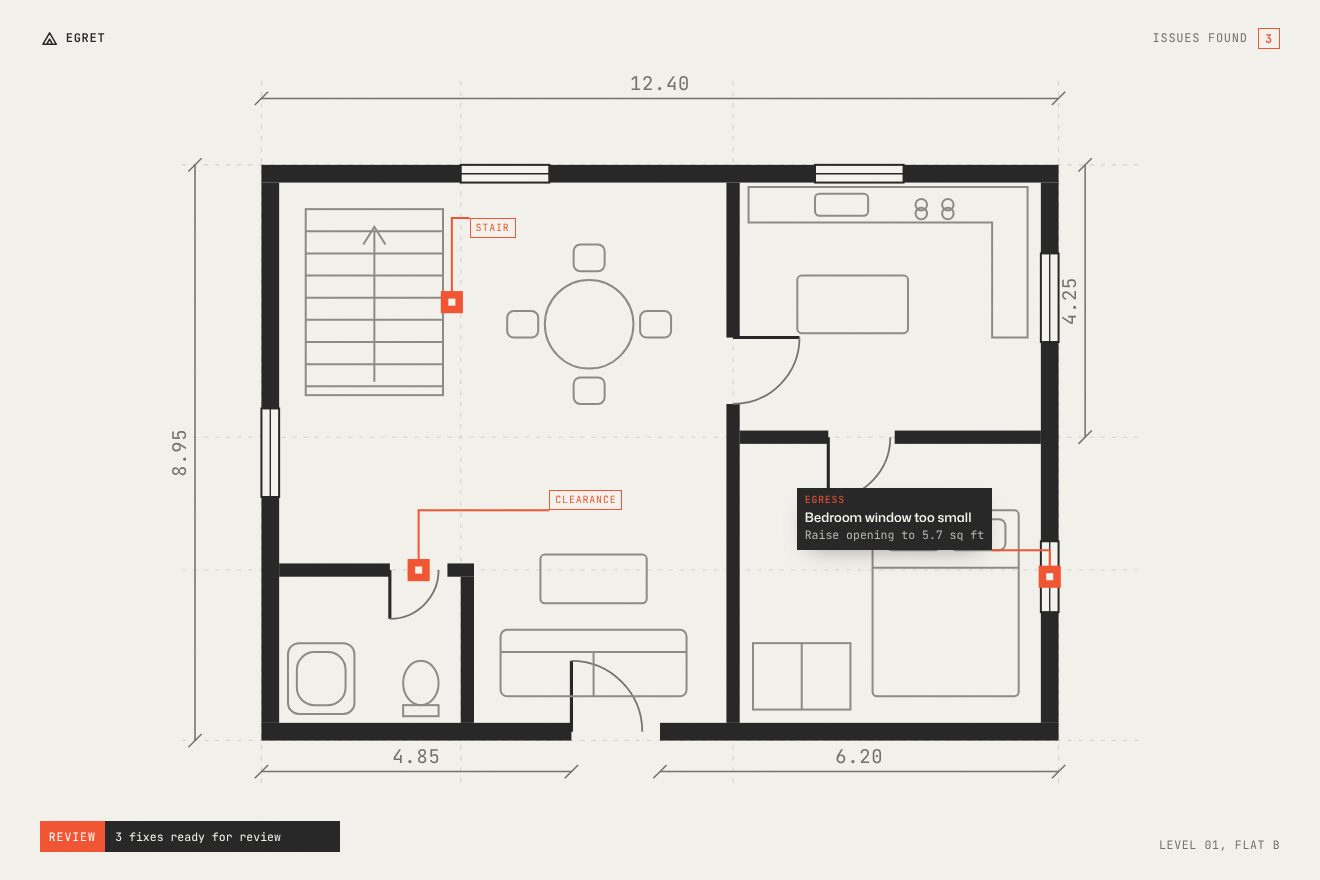
It is a single timeline tied to scrolling, with scrub, starting when the section reaches the middle of the window. The sentences come in from three rem lower and slightly bigger, at 1.04, and leave three rem higher and slightly smaller, at 0.96. The walls are all the paths of the plan: they start transparent and scaled to 1.1 and go back to 1 with a stagger of two hundredths in all, in random order, so they seem to settle together but not in a row. Then the following layers, furniture, dimensions and violations, light up one after another, and each opens its card.
In our demo the plan is a flat drawn by us, with the stairs, the table, the kitchen, the bed and the bathroom, and the dimension lines, in metres, grow from the centre. From the site come the two sentences with their three rem and their scales, the walls from 1.1 to 1 in random order and the layers arriving after, each with its card. We changed one thing: the walls settle over one point six seconds of scrolling instead of two hundredths, so the random order can be seen. Ours are the counter of things found rolling in a corner, the status line at the bottom telling what the agent is doing, and the cards that fold into a label with just the name when the next one arrives.
The other details
The intro headline is split into letters, all grey, and as you scroll they darken one after another to near black, three hundredths apart. In the Why us section an orange horizontal line follows the pointer vertically, closing a fifth of the distance each time, and the card beside it centres itself on the line. The buttons fill in pixels: the background is masked by a twenty-frame image of small squares, and on hover the mask slides in 580 milliseconds with steps(19), in jumps, while the label changes colour in fifteen hundredths. The page change closes the page towards the centre with a clip-path, in eight tenths, and opens it again in as long. The closing call to action and the footer are revealed by an ink blot that grows with scrolling, and at the very bottom the name HERON AI is huge, outline only.
Where it stumbles
The loading screen lasts five and a half seconds and starts again on every arrival on the home page: the site writes to sessionStorage that the page has already been loaded, and reads it back, but then never uses that value to skip it. Reduced motion is respected only by the cursor and the pixel buttons; the loading screen, the scroll timelines and the plan ignore it. Scrolling is not the window’s but that of an inner container, and the cursor is a small square drawn on a canvas that chases the pointer. On Awwwards the lowest marks are accessibility, 6.8, and markup, 6.6: the HTML has 23 images with empty alternative text against 4 described, and the doubled words of the rolling effects, «Accept Accept», «Product Product», are read twice.
The code also shows some haste. The main file switches off the browser console, but two console.log calls remain, and the function that should send the footer sign-up form only writes a line to that switched-off console. The script loader still holds the branch that looks for the development server on localhost:3000, and the HTML its commented-out lines. The versions are mixed, GSAP 3.12.5 with the 3.13 plugins, and Barba and Swiper come without a fixed version.
What we take away
Heron AI sells a tool for architects by speaking their language: paper, stroke, ruler, dimension, and a single colour to say «here». The animations do not decorate, they do what an architect would do: draw, measure, circle. And the gesture that stays with you is the simplest one in the trade: dragging a box over the drawing and finding what is missing.
The effects
- Drawing trace loaderThe loading screen of an AI agent for architects, on drawing paper: the elevation of a house traces itself line by line while a thin orange line grows with the percentage, and beside it a monospaced card lights up its start-up list. At one hundred the line splits, one half runs up, the other down, and between them the full drawing opens, with its concrete, glass and hatched shadows. Then the title rises word by word.Free
- Drawing error finderThe opening of an AI agent for architects: a house elevation drawn in fine lines between two rulers, with a vertical line, a horizontal line and an orange plus following the pointer and the coordinates in pixels beside it. Dragging opens an orange box, and every error it touches opens its label, while the proposed fix draws itself on the house.Free
- Floor plan assemblyThe plan section of Egret, a made-up AI agent for architects, on light paper with a single orange: as you scroll, two big sentences take turns, then the floor plan of a flat draws itself, with the walls settling one at a time in random order, the furniture, the dimensions, and the orange marks of what needs fixing, each with its own card.Free